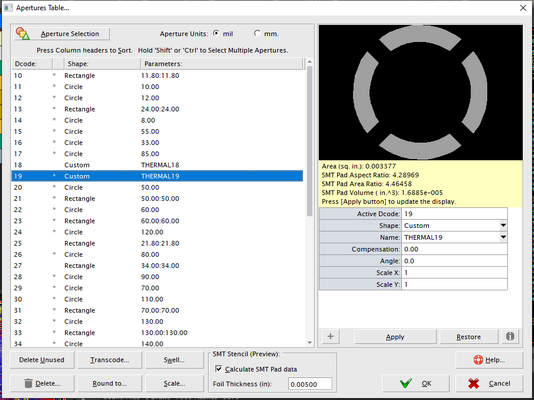
Create an Aperture definition used in PCB Designs and reference by Dcode value.
Apertures are referenced by their Dcode number.
<Aperture></Aperture>
Aperture Shapes
| Description |
| UNITS | Optional. Units to use for this APERTURE array only. Choose from: mil mm cm inch um (default: mm) |
| DCODE | Optional. Dcode number for the Aperture (reference).
- Note
- DCODE must be between 10-20000 (It's in the Gerber format)
Example:
|
| ANGLE | Optional. Rotates the Aperture (in degrees)
Example:
|
| SCALE | Optional. Scales the Aperture (in both X and Y directions)
Example:
|
| Bullet | Add a Bullet aperture using Width and Height
<Bullet>WIDTH,HEIGHT</Bullet>
WIDTH of the Bullet (X direction)
HEIGHT of the Bullet (Y direction)
Example:
<Bullet>0.25,0.1</Bullet><br>
|
| Butterfly | Add a Butterfly aperture.
<Butterfly>WIDTH</Butterfly>
WIDTH is the Butterfly diameter
Example:
<Butterfly>0.1</Butterfly>
|
| Circle | Add a Circle aperture.
<CIRCLE>WIDTH</CIRCLE>
WIDTH is the Circle diameter
Example:
<CIRCLE>0.1</CIRCLE>
|
| Cross | Add a Cross aperture.
<Cross>WIDTH,HEIGHT,H_LINEWIDTH,V_LINEWIDTH</Cross>
WIDTH of the Cross (X direction)
HEIGHT of the Cross (Y direction)
H_LINEWIDTH Horizontal Line Width of the Cross
V_LINEWIDTH Vertical Line Width of the Cross
Example:
<Cross>0.25,0.1,0.02,0.03</Cross>
|
| Custom | Add a Custom Aperture.
<Custom>NAME</Custom>
NAME is the name of the Custom Aperture definition. LEarn more about Custom Aperture definitions
Example:
<Custom>Stencil22</Custom>
|
| Ellipse | Add a Ellipse aperture using Width and Height
<Ellipse>WIDTH,HEIGHT</Ellipse>
WIDTH of the Ellipse (X direction)
HEIGHT of the Ellipse (Y direction)
Example:
<Ellipse>0.25,0.1</Ellipse>
|
| Diamond | Add a Diamond aperture using Width and Height
<Diamond>WIDTH,HEIGHT</Diamond>
WIDTH of the Diamond (X direction)
HEIGHT of the Diamond (Y direction)
Example:
<Diamond>0.25,0.1</Diamond>
|
| Dogbone | Add a Dogbone aperture.
<Dogbone>WIDTH,HEIGHT,H_LINEWIDTH,V_LINEWIDTH</Dogbone>
WIDTH of the Dogbone (X direction)
HEIGHT of the Dogbone (Y direction)
H_LINEWIDTH Horizontal Line Width of the Dogbone
V_LINEWIDTH Vertical Line Width of the Dogbone
Example:
<Dogbone>0.25,0.1,0.02,0.03</Dogbone>
|
| Donut | Add a Donut aperture.
OD is the Donut Outer diameter
ID is the Donut Inner diameter
Example:
<DONUT>0.2,0.1</DONUT>
|
| DonutSquare | Add a Square Donut aperture.
OD is the Donut Outer width
ID is the Donut Inner width
Example:
<DonutSquare>0.2,0.1</DonutSquare>
|
| DonutSquareRound | Add a DonutSquareRound aperture.
OD is the DonutSquareRound Outer diameter
ID is the DonutSquareRound Inner diameter
Example:
<DonutSquareRound>0.2,0.1</DonutSquareRound>
|
| DonutRectRounded | Add a DonutRectRounded aperture.
<DonutRectRounded>WIDTH,HEIGHT,CORNER</DonutRectRounded>
WIDTH of the DonutRectRounded (X direction)
HEIGHT of the DonutRectRounded (Y direction)
LINEWIDTH of the DonutRectRounded
CORNER Size of DonutRectRounded radius
Example:
<DonutRectRounded>0.25,0.1,0.02,0.02</DonutRectRounded>
|
| DonutRoundedSquare | Add a DonutRoundedSquare aperture.
<DonutRoundedSquare>OD,ID,CORNER</DonutRoundedSquare>
OD of the DonutRoundedSquare (X direction)
ID of the DonutRoundedSquare (Y direction)
CORNER Size of DonutRoundedSquare radius
Example:
<DonutRoundedSquare>0.25,0.1,0.02</DonutRoundedSquare>
|
| DonutRectangle | Add a DonutRectangle aperture.
<DonutRectangle>WIDTH,HEIGHT,LINEWIDTH</DonutRectangle>
WIDTH of the DonutRectangle (X direction)
HEIGHT of the DonutRectangle (Y direction)
LINEWIDTH of the DonutRectangle
Example:
<DonutRectangle>0.25,0.1,0.02</DonutRectangle>
|
| DonutOval | Add a DonutOval aperture.
<DonutOval>WIDTH,HEIGHT,LINEWIDTH</DonutOval>
WIDTH of the DonutOval (X direction)
HEIGHT of the DonutOval (Y direction)
LINEWIDTH of the DonutOval
Example:
<DonutOval>0.25,0.1,0.02</DonutOval>
|
| DPack | Add a DPack aperture.
<DPack>WIDTH,HEIGHT,COLUMNS,ROWS</DPack>
WIDTH of the DPack (X direction)
HEIGHT of the DPack (Y direction)
COLUMNS Horizontal Line Width of the DPack
ROWS Vertical Line Width of the DPack
Example:
<DPack>0.25,0.1,5,4</DPack>
|
| Hash | Add a Hash aperture.
<Hash>WIDTH,HEIGHT,H_LINEWIDTH,V_LINEWIDTH</Hash>
WIDTH of the Hash (X direction)
HEIGHT of the Hash (Y direction)
H_LINEWIDTH Horizontal Line Width of the Hash
V_LINEWIDTH Vertical Line Width of the Hash
Example:
<Hash>0.25,0.1,0.02,0.03</Hash>
|
| Hexagon | Add a Hexagon aperture.
<Hexagon>WIDTH</Hexagon>
WIDTH is the Hexagon diameter
Example:
<Hexagon>0.1</Hexagon>
|
| HexagonHorizontal | Add a Hexagon Horizontal aperture.
<HexagonHorizontal>WIDTH,HEIGHT,CORNER</HexagonHorizontal>
WIDTH of the Hexagon Horizontal (X direction)
HEIGHT of the Hexagon Horizontal (Y direction)
CORNER Size of Hexagon Horizontal radius
Example:
<HexagonHorizontal>0.25,0.1,0.02</HexagonHorizontal>
|
| HexagonVertical | Add a Vertical Horizontal aperture.
<HexagonVertical>WIDTH,HEIGHT,CORNER</HexagonVertical>
WIDTH of the Hexagon Vertical (X direction)
HEIGHT of the Hexagon Vertical (Y direction)
CORNER Size of Hexagon Vertical radius
Example:
<HexagonVertical>0.25,0.1,0.02</HexagonVertical>
|
| HomePlate | Add a HomePlate aperture.
<HomePlate>WIDTH,HEIGHT,CUTSIZE</HomePlate>
WIDTH of the HomePlate (X direction)
HEIGHT of the HomePlate (Y direction)
CUTSIZE of the HomePlate
Example:
<HomePlate>0.25,0.1,0.02</HomePlate>
|
| HomePlateInverted | Add a HomePlateInverted aperture.
<HomePlateInverted>WIDTH,HEIGHT,CUTSIZE</HomePlateInverted>
WIDTH of the HomePlateInverted (X direction)
HEIGHT of the HomePlateInverted (Y direction)
CUTSIZE of the HomePlateInverted
Example:
<HomePlateInverted>0.25,0.1,0.02</HomePlateInverted>
|
| HomePlateRadiused | Add a HomePlateRadiused aperture.
<HomePlateRadiused>WIDTH,HEIGHT,STENCIL_RELIEF</HomePlateRadiused>
WIDTH of the HomePlateRadiused (X direction)
HEIGHT of the HomePlateRadiused (Y direction)
STENCIL_RELIEF of the HomePlateRadiused
Example:
<HomePlateRadiused>0.25,0.1,0.02</HomePlateRadiused>
|
| HomePlateInvertedRadiused | Add a HomePlateInvertedRadiused aperture.
<HomePlateInvertedRadiused>WIDTH,HEIGHT,CURVE_SIZE</HomePlateInvertedRadiused>
WIDTH of the HomePlateInvertedRadiused (X direction)
HEIGHT of the HomePlateInvertedRadiused (Y direction)
CURVE_SIZE of the HomePlateInvertedRadiused
Example:
<HomePlateInvertedRadiused>0.25,0.1,0.02</HomePlateInvertedRadiused>
|
| HomePlateFlat | Add a HomePlateFlat aperture.
<HomePlateFlat>WIDTH,HEIGHT,CUTSIZE</HomePlateFlat>
WIDTH of the HomePlateFlat (X direction)
HEIGHT of the HomePlateFlat (Y direction)
CUTSIZE of the HomePlateFlat
V_CUTSIZE Vertical Cutsize of the HomePlateFlat
Example:
<HomePlateFlat>0.25,0.1,0.02</HomePlateFlat>
|
| Moire | Add a Moire aperture.
<Moire>RING_WIDTH,RING_GAP,RING_COUNT,LINE_WIDTH,LINE_LENGTH</Moire>
RING_WIDTH of the Moire
RING_GAP of the Moire
RING_COUNT of the Moire
LINE_WIDTH of the Moire
LINE_LENGTH of the Moire
Example:
<Moire>0.203,0.406,4,0.203,4.064</Moire>
|
| Oblong | Add a Oblong aperture using Width and Height
<Oblong>WIDTH,HEIGHT</Oblong>
WIDTH of the Oblong (X direction)
HEIGHT of the Oblong (Y direction)
Example:
<Oblong>0.25,0.1</Oblong>
|
| Octagon | Add a Octagon aperture.
<Octagon>WIDTH,HEIGHT,CORNER</Octagon>
WIDTH of the Octagon (X direction)
HEIGHT of the Octagon (Y direction)
CORNER Size of Octagon radius
Example:
<Octagon>0.25,0.1,0.02</Octagon>
|
| Polygon | Adds a polygon aperture using X,Y Points.
POINT_COUNT is the number of points for the polygon.
X,Y,... are the X,Y point array.
Example:
<POLYGON>7,-9,-9,-9,-8,-8.25,-8,-8.25,-6,-2,-6,-2,-9,-9,-9</POLYGON>
|
| PolygonInternal | Adds an internal (i.e clear) polygon aperture using X,Y Points.
POINT_COUNT is the number of points for the polygon.
X,Y,... are the X,Y point array.
Example:
<POLYGONINTERNAL>7,-9,-9,-9,-8,-8.25,-8,-8.25,-6,-2,-6,-2,-9,-9,-9</POLYGON_INTERNAL>
|
| Rectangle | Add a Rectangle aperture using Width and Height
<Rectangle>WIDTH,HEIGHT</Rectangle>
WIDTH of the Rectangle (X direction)
HEIGHT of the Rectangle (Y direction)
Example:
<Rectangle>0.25,0.1</Rectangle>
|
| RectChamfered | Add a Chamfered Rectangle aperture.
<RectChamfered>WIDTH,HEIGHT,CORNER</RectChamfered>
WIDTH of the Rectangle (X direction)
HEIGHT of the Rectangle (Y direction)
CORNER Size of Rectangle chamfer
Example:
<RectChamfered>0.25,0.1,0.02</RectChamfered>
|
| RectRounded | Add a Rounded Rectangle aperture.
<RectRounded>WIDTH,HEIGHT,CORNER</RectRounded>
WIDTH of the Rectangle (X direction)
HEIGHT of the Rectangle (Y direction)
CORNER Size of Rectangle radius
Example:
<RectRounded>0.25,0.1,0.02</RectRounded>
|
| SButterfly | Add a Butterfly aperture.
<SButterfly>WIDTH</SButterfly>
WIDTH is the SButterfly diameter
Example:
<SButterfly>0.1</SButterfly>
|
| ThermalOblong | Add a ThermalOblong aperture.
<ThermalOblong>WIDTH,HEIGHT,LINEWIDTH</ThermalOblong>
WIDTH of the ThermalOblong (X direction)
HEIGHT of the ThermalOblong (Y direction)
LINEWIDTH of the ThermalOblong
Example:
<ThermalOblong>0.25,0.1,0.02</ThermalOblong>
|
| ThermalLine | Add a ThermalLine aperture.
<ThermalLine>OD,ID,AIR_GAP</ThermalLine>
OD of the ThermalLine
ID of the ThermalLine
AIR_GAP of the ThermalLine
Example:
<ThermalLine>0.2,0.15,45,4,0.025</ThermalLine>
|
| Target | Add a Target aperture.
<Target>WIDTH</Target>
WIDTH is the Target diameter
Example:
<Target>0.1</Target>
|
| Thermal | Add a Thermal aperture.
<Thermal>OD,ID,SPOKE_ANGLE,CROSSHAIR_COUNT,CROSSHAIR_THICKNESS</Thermal>
OD of the Thermal
ID of the Thermal
SPOKE_ANGLE of the Thermal
CROSSHAIR_COUNT of the Thermal
CROSSHAIR_THICKNESS of the Thermal
Example:
<Thermal>0.2,0.15,45,4,0.025</Thermal>
|
| ThermalSq | Add a ThermalSq aperture.
<ThermalSq>OD,ID,SPOKE_ANGLE,CROSSHAIR_COUNT,CROSSHAIR_THICKNESS</ThermalSq>
OD of the ThermalSq
ID of the ThermalSq
SPOKE_ANGLE of the ThermalSq
CROSSHAIR_COUNT of the ThermalSq
CROSSHAIR_THICKNESS of the ThermalSq
Example:
<ThermalSq>0.2,0.15,45,4,0.025</ThermalSq>
|
| ThermalSqRound | Add a ThermalSqRound aperture.
<ThermalSqRound>OD,ID,SPOKE_ANGLE,CROSSHAIR_COUNT,CROSSHAIR_THICKNESS</ThermalSqRound>
OD of the ThermalSqRound
ID of the ThermalSqRound
SPOKE_ANGLE of the ThermalSqRound
CROSSHAIR_COUNT of the ThermalSqRound
CROSSHAIR_THICKNESS of the ThermalSqRound
Example:
<ThermalSqRound>0.2,0.15,45,4,0.025</ThermalSqRound>
|
| ThermalRoundedSquare | Add a ThermalRoundedSquare aperture.
<ThermalRoundedSquare>OD,ID,SPOKE_ANGLE,CROSSHAIR_COUNT,CROSSHAIR_THICKNESS</ThermalRoundedSquare>
OD of the ThermalRoundedSquare
ID of the ThermalRoundedSquare
SPOKE_ANGLE of the ThermalRoundedSquare
CROSSHAIR_COUNT of the ThermalRoundedSquare
CROSSHAIR_THICKNESS of the ThermalRoundedSquare
Example:
<ThermalRoundedSquare>0.2,0.15,45,4,0.025</ThermalRoundedSquare>
|
| ThermalRoundedRectangle | Add a ThermalRoundedRectangle aperture.
<ThermalRoundedRectangle>WIDTH,HEIGHT,SPOKE_ANGLE,CROSSHAIR_COUNT,CROSSHAIR_THICKNESS,AIR_GAP</ThermalRoundedRectangle>
WIDTH of the ThermalRoundedRectangle
HEIGHT of the ThermalRoundedRectangle
SPOKE_ANGLE of the ThermalRoundedRectangle
CROSSHAIR_COUNT of the ThermalRoundedRectangle
CROSSHAIR_THICKNESS of the ThermalRoundedRectangle
AIR_GAP of the ThermalRoundedRectangle
Example:
<ThermalRoundedRectangle>0.2,0.15,45,4,0.025,0.025</ThermalRoundedRectangle>
|
| ThermalOval | Add a ThermalOval aperture.
<ThermalOval>WIDTH,HEIGHT,LINEWIDTH</ThermalOval>
WIDTH of the ThermalOval (X direction)
HEIGHT of the ThermalOval (Y direction)
LINEWIDTH of the ThermalOval
Example:
<ThermalOval>0.25,0.1,0.02</ThermalOval>
|
| ThermalRectangle | Add a ThermalRectangle aperture.
<ThermalRectangle>WIDTH,HEIGHT,SPOKE_ANGLE,CROSSHAIR_COUNT,CROSSHAIR_THICKNESS,AIR_GAP</ThermalRectangle>
WIDTH of the ThermalRectangle
HEIGHT of the ThermalRectangle
SPOKE_ANGLE of the ThermalRectangle
CROSSHAIR_COUNT of the ThermalRectangle
CROSSHAIR_THICKNESS of the ThermalRectangle
AIR_GAP of the ThermalRectangle
Example:
<ThermalRectangle>0.2,0.15,45,4,0.025,0.025</ThermalRectangle>
|
| Trapezoid | Add a Trapezoid aperture.
<Trapezoid>BASE,HEIGHTH,TOP,DELTA</Trapezoid>
BASE of the Trapezoid
HEIGHT of the Trapezoid
TOP of the Trapezoid
DELTA of the Trapezoid
Example:
<Trapezoid>2.032,2.032,1.52,0.254</Trapezoid>
|
| Triangle | Add a Triangle aperture.
<Triangle>BASE,HEIGHTH</Triangle>
BASE of the Triangle
HEIGHT of the Triangle
Example:
<Triangle>0.2,0.1</Triangle>
|